
SoftSync says “Control Failed to Load! Check Browser Security Settings” when I attempt to run an update
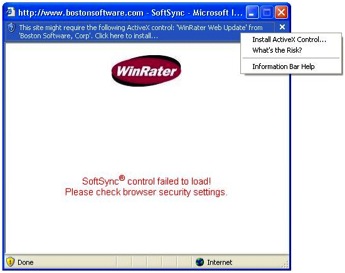 You’re getting this error message because the ActiveX control needed to run SoftSync from our servers is blocked by your browser’s security settings. You will need to install the ActiveX control before SoftSync will work.
How to install ActiveX control:
Click on the banner at the top of the page that says “Click here to install…”
Click on “Install ActiveX control” in the white box.
Once the ActiveX control has been installed, you should be able to run SoftSync without any problems.