Back To Top >>
You don't need an e-mail link to check for updates. You have two options, either visit www.bostonsoftware.com/update (we recommend bookmarking this URL in your browser window for easy access) or you can follow these instructions to update from your desktop.
Only one user needs to run the update if the program is installed on a network with other users accessing it.
SoftSync will update only products that have been accessed by the workstation running the update. If a program status appears as "Not Installed" and you know it is, run the program from that workstation and try SoftSync again.
At times internet traffic may result in timeout related errors such as "Socket Error 10054" or the SoftSync process seems to "hang". Please try again later.
A program with a status of "Superseded" needs to be updated with a CD before the SoftSync updates are allowed. Please contact Boston Software to receive an updated CD.
I received an error stating that my updates failed to install when using the “Enhanced Version” of SoftSync. What should I do?
When SoftSync appears to be doing nothing or 'Socket error 10054'
E-mail link 'Error transferring file' message
SoftSync working with a firewall
SoftSync loads but no products appear in the list
Security warning to install SoftSync ActiveX control
SoftSync control will not load or ActiveX controls are prohibited
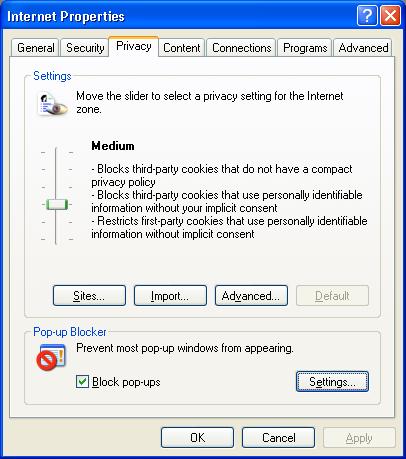
Nothing happens when I press the 'Enter' button on the welcome screen
Firewall message after updating to WinXP service pack 2
Missing DLL (winsock2.dll) error when trying to update via SoftSync
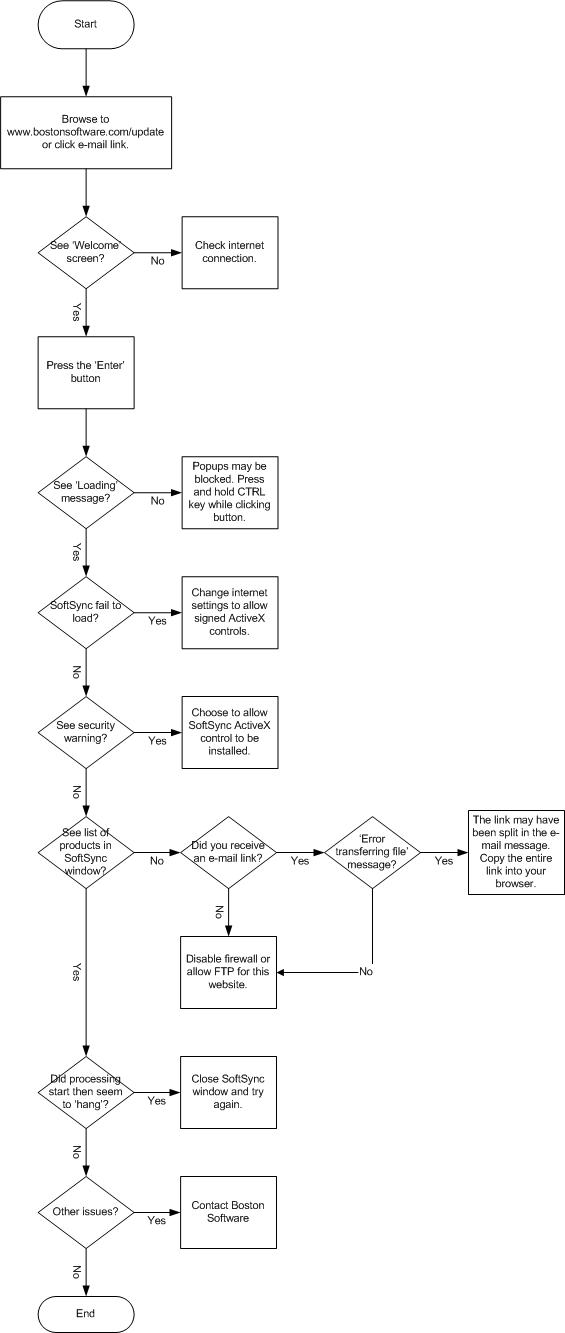
Troubleshooting flowchart
The solution for this is a relatively simple one-time adjustment. Give us a call at (781) 449-8585 and we’ll walk you through it.
Back To Top >>
The normal process of SoftSync involves validating products in the list, checking whether they are installed and/or up-to-date. If updates are available, files will be transferred and installed. Sometimes during validation or transferring, processing appears to stop.
Usually this is a result of heavy internet traffic or load on the SoftSync
server. Close the SoftSync window (may require using task manager to end the
process) and try again.
Back To Top >>
Occasionally you may receive an e-mail link for an update. Sometimes the lines of an e-mail message you receive are split to a certain length. When this happens it may be that the link to your update was split and is now not complete. If this is the case, paste the entire address into your browser.
See above 'Did You Know' item
regarding an alternative way of updating all your WinRater products so that
an e-mail link is not necessary.
Back To Top >>
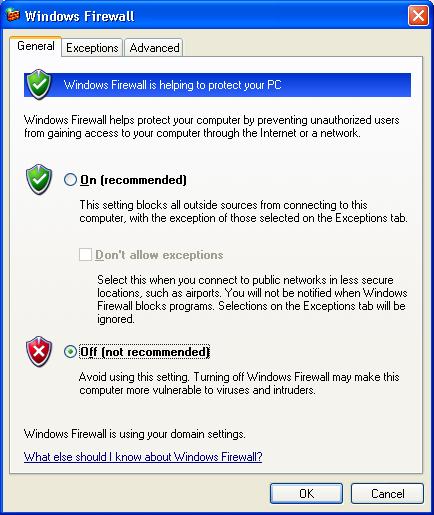
SoftSync transfers files via HTTP and FTP. If either of these protocols are blocked by a firewall, updating will fail.
See also a typical symptom where no products appearing in the list
You can try temporarily diabling the firewall to see if it is the culprit. If
so either add bostonsoftware.com to a 'white list' or make sure FTP is enabled.
Back To Top >>
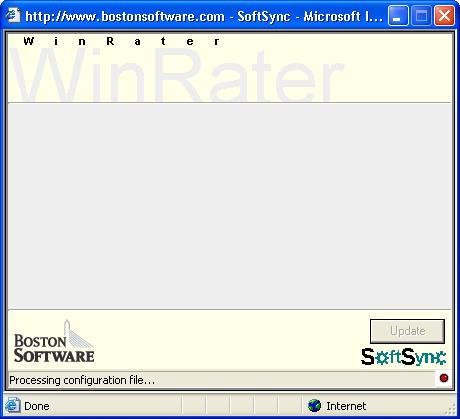
SoftSync may load but the list of products is empty. The status bar may say 'Processing configuration file...' and nothing more happens.
You may have a firewall installed that is preventing further processing.
See more information about firewalls.
Back To Top >>
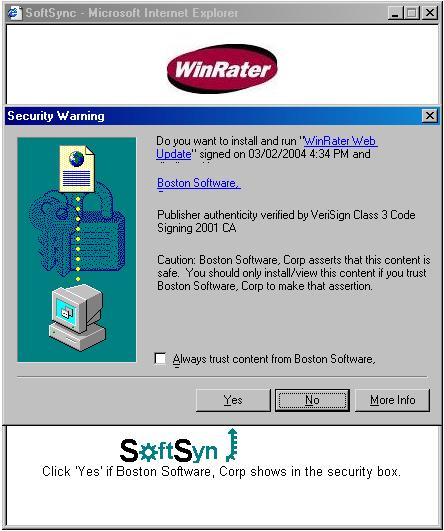
This warning appears whenever an ActiveX control such as SoftSync is going to be installed on your computer.
If the ActiveX control is SoftSync and the file is signed by Boston Software, choose to install it. This control gives your computer the ability to receive WinRater updates.
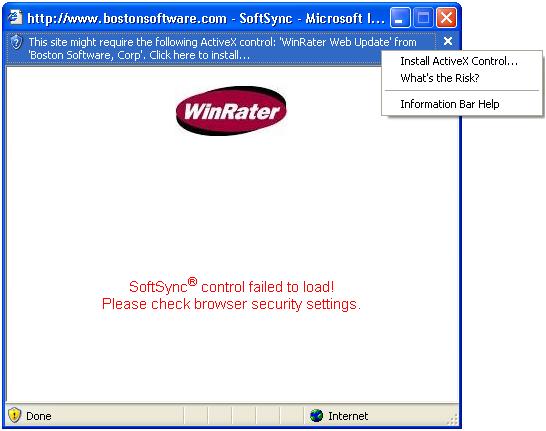
Change your internet settings for your browser to allow the download of signed and the running of ActiveX controls.
If you are using WinXP you will probably see a message toward the top of the
page mentioning a required ActiveX control. If ActiveX controls are enabled, you
will be able to install it by clicking on the message. See Security warning to install SoftSync ActiveX control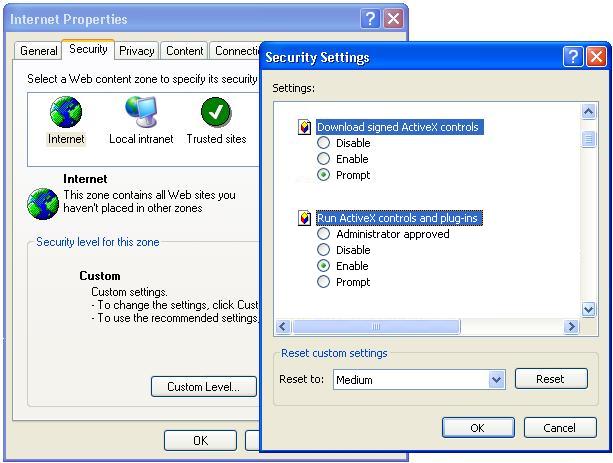
Back To Top >>
You may have a popup blocker installed that is preventing SoftSync from starting. Most popup blockers allow a 'white list' of acceptable sites.
Or you can usually temporarily disable the popup blocker by pressing and holding
the CTRL key when pressing the 'Enter' button and the new window is loading.
Back To Top >>
After installing Windows XP service pack 2, when running SoftSync, you may get a message regarding the windows firewall.
'Windows Security Alert' 'Do you want to keep blocking this program?'
Choose UNBLOCK. This allows SoftSync to update your WinRater products.
Back To Top >>
You may try to update via SoftSync and gets an error stating that a library file is missing. (winsock2.dll) This error may appear on Windows 95 machines.
Try to update via SoftSync on another machine. See above 'Did You Know'
item regarding not needing to update all workstations. If that is not possible, you
can download the missing file for your Win95 machine from Microsoft.
Click here
Back To Top >>
If you are having trouble with the SoftSync process, please follow the below flowchart.
Back To Top >>