
The message "WinRater Rating Suite in use" appears while running SoftSync on a networked WinRater system
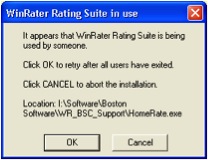 This error happens most frequently when you try to run SoftSync on your shared network, but someone has not closed out of WinRater. First, make sure everyone is out of WinRater and re-run SoftSync.
Everyone’s out of WinRater and I’m still getting the message.
If you are still getting the error message even after everyone is out of WinRater, then a file (most often the Homerate.exe file) has remained open on one of the workstations, even though WinRater is closed. You will need to close the file or reboot the workstation with the open file.
To check for an open file:
- Hit Control-Alt-Delete to bring up the Task Manager
- Click on the Processes Tab
- Check to see if Homerate.exe is open. If so, click on it. Then click on “End Process”, and “Yes” to confirm.